v2.1.0-beta.2
August 17, 2026
Citation Popover, copy bibliography, note-class Entry Serials
Highlights
Citation Popover
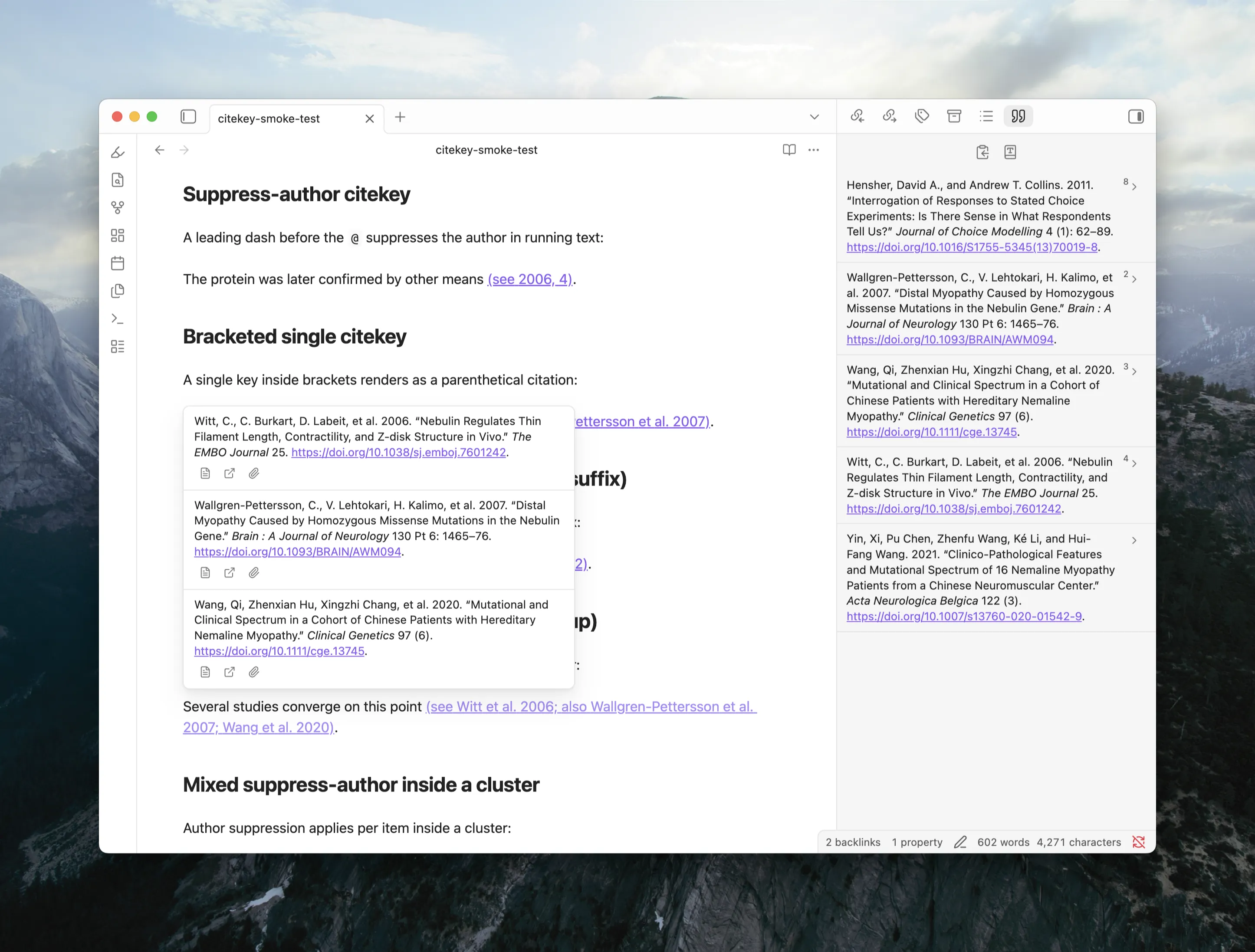
Hovering a citation now shows a popover with each cited item's full formatted bibliography entry, stacked in citation order for multi-item citations. Each entry carries action buttons to open the Literature Note, open the item in Zotero, or open its attachment. The popover works on literal Pandoc citations in Live Preview, Reading view, and Source mode, and on Literature Note wikilinks when wikilink citations are enabled.
A new Hover action setting under Settings › ZotLit › Citations › Hover controls what citation hover shows:
- Citation Popover (default): the popover described above.
- Page preview: the previous behavior, showing the Literature Note page preview under Obsidian's own Page Preview settings.
- Off: no ZotLit hover at all; native wikilink hover stays untouched.
Each mode has its own Require modifier key toggles per editing mode (Source mode requires Mod by default; Live Preview and Reading view do not). The toggles live on a sub-page under the Hover action setting.
Citation data commands for agents
Three new CLI commands, zotlit:cited-by, zotlit:references, and zotlit:citations-guide, let an AI agent query which notes cite a given item and what a document cites. Install the zotlit-citations skill for your agent to use this workflow.
What's New
Copy bibliography
The References Sidebar toolbar now offers a Copy bibliography action. One click copies the full reference list as both rich text and plain text. Emphasis, superscript, small caps, and DOI links survive a paste into Word or Google Docs. A destination that takes only plain text falls back to the text version, and the notice tells you which format was copied.
Note-class citation styles
Styles that use footnotes (such as Chicago full-note) now show numbered Entry Serials beside each citation inline and in the References Sidebar gutter, so you can see at a glance which reference number a citation carries.
Open citations as links
The Open Pandoc citations as links setting is now Open citations as links and covers both Pandoc citations and Literature Note wikilinks. It is off by default. While off, clicking a rendered citation in Live Preview places the cursor in its Markdown source (the widget collapses like clicked bold text). Mod+click still opens the Literature Note regardless of this setting.
Other improvements
- The References Sidebar toolbar now includes a Change citation and references style shortcut that opens the style picker in settings.
- Two-creator summaries (e.g. "Wang and Lee") now follow your locale's list formatting conventions.
Bug Fixes
- Fixed the Zotero database refreshing every few seconds even when nothing changed. A filesystem echo from the database clone triggered a self-feeding loop on APFS volumes.
- Fixed Mod+Enter in the note quick switcher not opening the note in a new pane. The keyboard shortcut was advertised but never registered. The modifier label now also shows the correct key per platform.
- Fixed Shift+Enter in the citation insert modal not inserting the secondary citation form. The keyboard shortcut was advertised but never registered.
- Fixed citations inside inline footnotes (
^[...]) rendering at body text size instead of matching the footnote's superscript size. - Fixed
^[...]being read as a citation cluster instead of an inline footnote. The bracket after a caret now starts an inline note as Pandoc expects. - Fixed the References Sidebar engine banners overlapping with the reference list when the list was long enough to scroll.
- Fixed two items with the same filename colliding in the citation rendering. Each item now keeps its own bibliography entry and reference number, even when both are cited in the same document.